

React Native SDK Overview
The Zeta React Native SDK (zetakit_reactnative) brings the Zeta Marketing Platform (ZMP) to your React Native app through a single JavaScript package that bridges the native iOS and Android SDKs.
SDK version: This documentation covers React Native SDK 1.0.0. For earlier versions, see Prior React Native SDK guides.
Modern tech and React branding illustration
On this page
- What the SDK connects to
- Quickstart
- Requirements
- Native SDK compatibility
- Module at a glance
- Integration journey
- Advanced topics
What the SDK connects to
The React Native SDK feeds data into the Zeta Marketing Platform (ZMP), where it merges with the broader Zeta Data Cloud. This gives your app access to:
- Identity resolution -- the SDK associates app events with a unified Zeta ID, linking mobile behavior to email, web, and offline interactions.
- Cross-channel orchestration -- push notifications, in-app messages, and inbox entries are triggered by ZMP campaigns that can also span email, SMS, and paid media.
- Real-time activation -- events the SDK sends (screen views, custom events, user property changes) can fire campaign triggers within seconds.
- Enriched targeting -- ZMP combines first-party SDK data with behavioral and intent signals from the Data Cloud for audience segmentation.
Quickstart
Get from zero to a tracked event in under five minutes.
- Install the package:
yarn add zetakit_reactnative-
Run platform setup (iOS requires
pod install, Android requiresgoogle-services.jsonfor push). -
Initialize the SDK and send your first event:
import ZetaClient, {
  ZTRegion,
  ZTAppEnvironment,
} from 'zetakit_reactnative';

const config = {
  clientSiteId: 'your-site-id',
  clientSecret: 'your-secret',
  region: ZTRegion.US,
  appGroupId: 'group.com.example.app',
  optIn: true,
  appEnvironment: ZTAppEnvironment.PRODUCTION,
};

ZetaClient.initialize(config, () => {
  ZetaClient.events.send('app_launched', {});
});
For full configuration options and opt-in behavior, continue to Getting Started.
Requirements
| Requirement | Minimum supported version |
|---|---|
| React Native | 0.76+ |
| iOS deployment target | 15.1+ |
| Android API level | 24 (Android 7.0)+ |
| Android Compile SDK | No special requirements beyond Firebase/Play Services for push |
Native SDK compatibility
The React Native SDK wraps the native platform SDKs. Each release is pinned to a specific native SDK version.
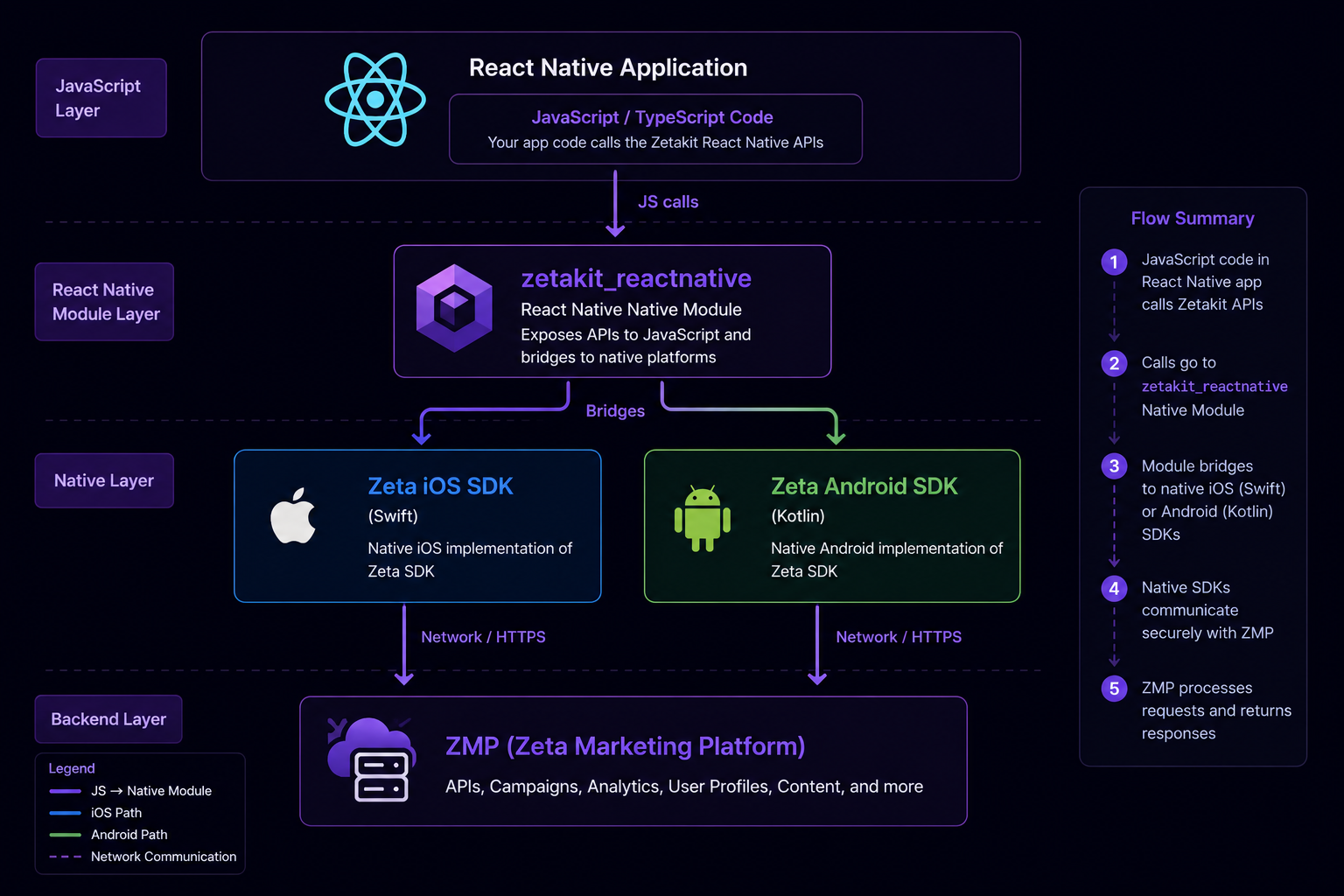
React Native app architecture diagram
| Platform | Native SDK version |
|---|---|
| iOS (ZetaCore) | 1.0.0 |
| Android (net.zetaglobal.app:core) | 1.0.1 |
See the iOS SDK documentation and Android SDK documentation for platform-specific details.
Module at a glance
The React Native SDK ships as a single npm package that includes both platform bridges:
| Component | Purpose |
|---|---|
zetakit_reactnative (JS) | Unified JavaScript API for configuration, user identity, events, in-app messaging, and push token forwarding. |
| iOS native bridge | Wraps ZetaCore and ZetaNotificationService via React Native's native module system. |
| Android native bridge | Wraps net.zetaglobal.app:core via React Native's native module system. |
Integration journey
The documentation follows the path a typical integration takes -- from installing the package to preparing for release. Work through it in order, or jump to the stage you need.
Set up and initialize
Get the package installed, wire up the native platforms, and initialize the client from JavaScript.
- Installation -- install via npm or yarn, set up iOS CocoaPods, and configure Android Gradle.
- Getting Started -- initialize the SDK in JavaScript and handle tracking opt-in/opt-out.
Integrate core features
With the SDK initialized, identify your users and capture their behavior. Contact management covers identifying users with a uid or emailId, adding email and phone contacts, and attaching custom properties. Event tracking covers auto-tracked lifecycle events, screen-name tracking, and custom events.
- Contact Management -- identify users, update properties, and track events.
Add messaging channels
Once users are identified, reach them through the channels orchestrated from ZMP.
- Push Notifications -- device-token forwarding from JavaScript, plus native iOS and Android setup for click tracking, deeplinks, and delivery tracking.
- In-App Messaging -- foreground, opt-in-free, SDK-rendered messages with optional email collection.
- App Inbox -- a persistent, queryable store of messages delivered to the user via the native bridge.
Prepare for release
Before shipping, reference the API surface, plan upgrades, and confirm version support.
- API Reference -- the full JavaScript/TypeScript surface:
ZetaClient, its accessors,ZTConfig, enums, events, and model types. - Migration Guide -- step-by-step instructions for upgrading between SDK versions.
- Changelog -- complete API-level changelog for every version.
- Data & Privacy -- data safety, opt-out behaviors, and GDPR/CCPA compliance.
- Versioning & Support -- SemVer policy, platform support matrix, and support channels.
Advanced topics
- Logging -- control native SDK log output through configurable log levels and privacy settings.
- Testing and QA -- verify your integration, test push and in-app payloads, and debug the native bridge layer.
- Push Troubleshooting -- diagnose bridge-specific push failures and link out to native APNs/FCM diagnostics.
Updated 3 months ago