

App Inbox
App Inbox delivers messages from the Zeta Marketing Platform to a persistent, queryable store inside your app.
Available since: iOS SDK 1.0.0.
This guide covers how to fetch, query, and manage inbox messages, handle CTA buttons, and convert status values. Your app owns the view layer; the SDK provides the data.
Note: All
ZTAppInboxManagablemethods areasyncand throw on failure. Wrap them indo/catchor propagate errors to your view model. Theasync/throwssurface is Swift-only; Obj-C consumers call the corresponding completion-handler-based methods on the same protocol.
On this page
- Access the inbox
- Fetch messages
- Query cached messages
- The ZTAppInboxMessage model
- Update message status
- Handle CTA buttons
- Convert status strings
Note: To create App Inbox campaigns, see User Guide: App Inbox for campaign setup from ZMP.
Access the inbox
The inbox is available through ZetaClient.shared.inbox, which returns an object conforming to ZTAppInboxManagable.
Important:
ZetaClient.shared.inboxisniluntilZetaClient.shared.initialize(config:)completes.
Fetch messages
fetchMessages() syncs the latest messages from the server and returns the full list of non-deleted messages, sorted by delivery time.
Note: The local store retains up to 200 active (non-deleted, non-expired) messages. The remote backup contains the most recent 50 messages. If a sync would increase the local count beyond 200, the oldest active messages are evicted from the local store.
Task {
    do {
        let messages = try await ZetaClient.shared.inbox?.fetchMessages() ?? []
        updateUI(with: messages)
    } catch {
        print("Inbox fetch failed: \(error)")
    }
}[[ZetaClient shared].inbox fetchMessagesWithCompletion:^(NSArray<ZTAppInboxMessage *> *messages, NSError *error) {
if (error != nil) {
NSLog(@"Inbox fetch failed: %@", error);
return;
}
[self updateUIWithMessages:messages];
}];Query cached messages
After a fetch, query cached messages without a network round-trip.
let unread      = try await ZetaClient.shared.inbox?.getUnreadMessages() ?? []
let read        = try await ZetaClient.shared.inbox?.getReadMessages() ?? []
let totalCount  = try await ZetaClient.shared.inbox?.getMessageCount() ?? 0
let unreadCount = try await ZetaClient.shared.inbox?.getUnreadMessageCount() ?? 0
let readCount   = try await ZetaClient.shared.inbox?.getReadMessageCount() ?? 0

let message = try await ZetaClient.shared.inbox?.getMessage(for: "MSG-001")[[ZetaClient shared].inbox getUnreadMessagesWithCompletion:^(NSArray<ZTAppInboxMessage *> *messages, NSError *error) { /* ... */ }];
[[ZetaClient shared].inbox getReadMessagesWithCompletion:^(NSArray<ZTAppInboxMessage *> *messages, NSError *error) { /* ... */ }];
[[ZetaClient shared].inbox getMessageCountWithCompletion:^(NSInteger count, NSError *error) { /* ... */ }];
[[ZetaClient shared].inbox getUnreadMessageCountWithCompletion:^(NSInteger count, NSError *error) { /* ... */ }];
[[ZetaClient shared].inbox getReadMessageCountWithCompletion:^(NSInteger count, NSError *error) { /* ... */ }];
[[ZetaClient shared].inbox getMessageFor:@"MSG-001"
completion:^(ZTAppInboxMessage *message, NSError *error) { /* ... */ }];The ZTAppInboxMessage model
ZTAppInboxMessage represents a single inbox entry.
| Property | Type | Description |
|---|---|---|
messageId | String | Unique identifier. Use this when calling any ZTAppInboxManagable method. |
id | String | Mirrors messageId. Provided for SwiftUI Identifiable (e.g. List / ForEach). |
title | String | Message headline. |
body | String | Message body text. |
mediaUrl | String? | Optional image / media URL. |
status | ZTAppInboxMessageStatus | READ, UNREAD, or DELETED |
expirationTimestamp | NSNumber? | Unix timestamp (ms) after which the message should not be shown. nil if the message has no expiration. |
actionList | [ZTCtaAction]? | CTA buttons attached to the message. |
templateId | String | Template identifier used to render the message. |
additionalData | [String: String] | Arbitrary key-value pairs from the campaign. |
ZTAppInboxMessage and ZTCtaAction conform to Codable and are exposed to Objective-C via @objcMembers. ZTAppInboxMessage also conforms to Identifiable.
expirationTimestamp is typed as NSNumber? so it bridges cleanly to Objective-C. In Swift, unwrap it and convert from milliseconds to a Date:
if let expiry = message.expirationTimestamp?.doubleValue {
    let expiresAt = Date(timeIntervalSince1970: expiry / 1000)
    if expiresAt < Date() {
        // Message has expired; skip rendering.
    }
}if (message.expirationTimestamp != nil) {
NSTimeInterval expiry = message.expirationTimestamp.doubleValue / 1000.0;
NSDate *expiresAt = [NSDate dateWithTimeIntervalSince1970:expiry];
if ([expiresAt compare:[NSDate date]] == NSOrderedAscending) {
// Message has expired; skip rendering.
}
}ZTAppInboxMessageStatus has three cases:
| Value | Meaning |
|---|---|
UNREAD | The user has not opened or interacted with the message yet. This is the default state for a freshly received inbox message. |
READ | The user has seen the message (or it has been programmatically acknowledged). |
DELETED | The user (or the app) has dismissed the message. Deleted messages are excluded from all query results. The SDK remembers the deletion so the message is not re-fetched on the next sync. |
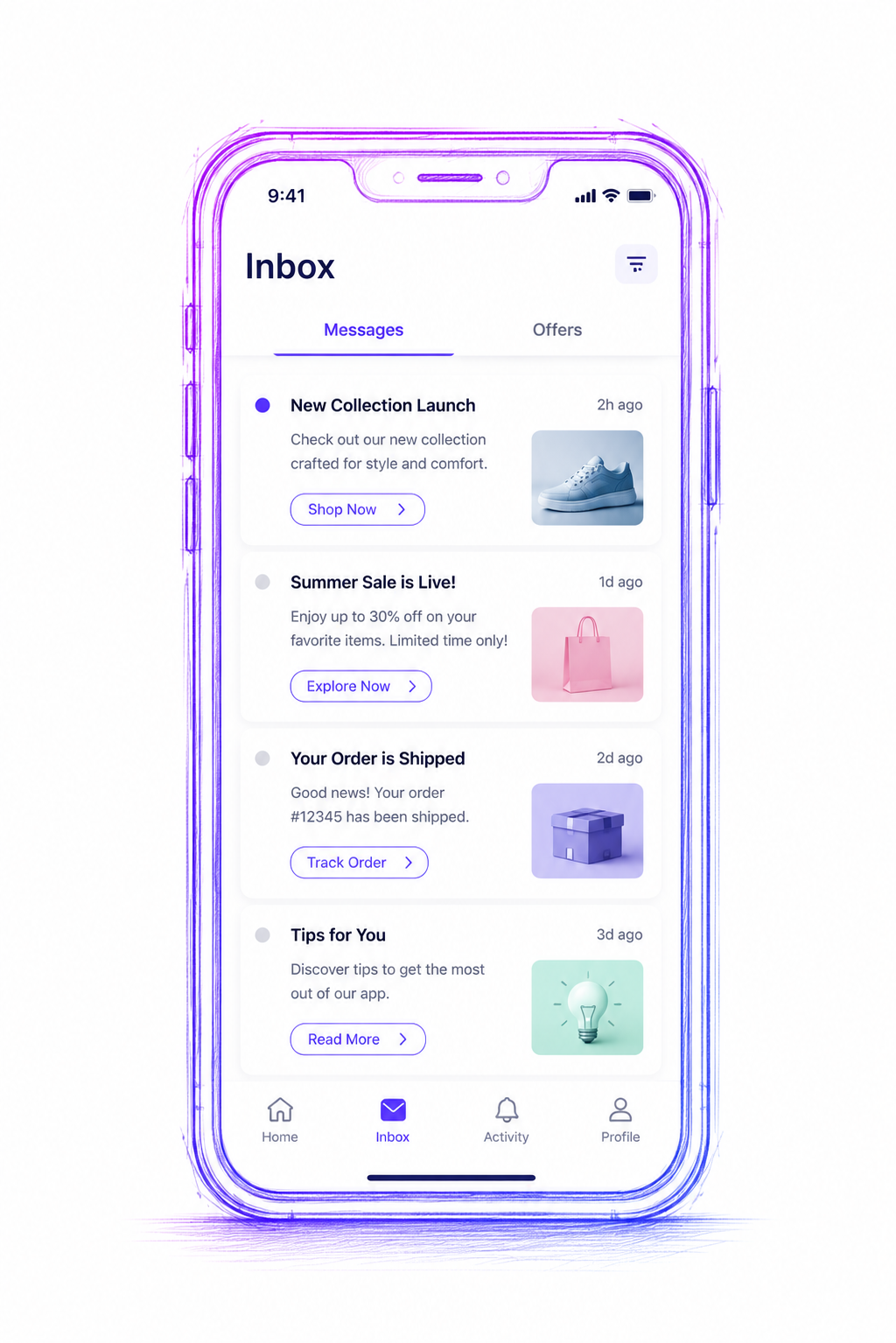
Wireframe of a custom inbox list row: title, body text, thumbnail media on the right, unread indicator dot on the left, and CTA button below
Update message status
Mark as read
try await ZetaClient.shared.inbox?.markMessageAsRead(messageId: "MSG-001")

let ids = messages.map(\.messageId)
let processed = try await ZetaClient.shared.inbox?.markAllMessagesAsRead(ids: ids)[[ZetaClient shared].inbox markMessageAsReadWithMessageId:@"MSG-001"
completion:^(NSError *error) { /* ... */ }];
NSArray<NSString *> *ids = [messages valueForKey:@"messageId"];
[[ZetaClient shared].inbox markAllMessagesAsReadWithIds:ids
completion:^(NSArray<NSString *> *processed, NSError *error) { /* ... */ }];Mark as deleted
try await ZetaClient.shared.inbox?.markMessageAsDeleted(messageId: "MSG-001")

let processed = try await ZetaClient.shared.inbox?.markAllMessagesAsDeleted(ids: ids)[[ZetaClient shared].inbox markMessageAsDeletedWithMessageId:@"MSG-001"
completion:^(NSError *error) { /* ... */ }];
[[ZetaClient shared].inbox markAllMessagesAsDeletedWithIds:ids
completion:^(NSArray<NSString *> *processed, NSError *error) { /* ... */ }];Deleted messages are excluded from future query results. markAllMessagesAsRead(ids:) and markAllMessagesAsDeleted(ids:) return the IDs that were successfully updated.
Clear all messages
Use clearAll() when the user logs out or switches accounts. This removes all cached messages and resets their status. The next fetchMessages() call repopulates from the server.
try await ZetaClient.shared.inbox?.clearAll()[[ZetaClient shared].inbox clearAllWithCompletion:^(NSError *error) { /* ... */ }];Handle CTA buttons
Messages may contain one or more call-to-action buttons, each represented by ZTCtaAction. When the user taps a button, call onMessageClicked() with the action's value (or link) to record the click and trigger any server-side automation. See ZTCtaAction fields below for the full property list.
func handleCTA(_ action: ZTCtaAction, in message: ZTAppInboxMessage) {
    Task {
        try? await ZetaClient.shared.inbox?.onMessageClicked(
            messageId: message.messageId,
            actionValue: action.value.isEmpty ? action.link : action.value
        )
    }

    if let url = URL(string: action.link), !action.link.isEmpty {
        UIApplication.shared.open(url)
    }
}- (void)handleCTA:(ZTCtaAction *)action inMessage:(ZTAppInboxMessage *)message {
NSString *actionValue = action.value.length > 0 ? action.value : action.link;
[[ZetaClient shared].inbox
onMessageClickedWithMessageId:message.messageId
actionValue:actionValue
completion:^(NSError *error) { /* ... */ }];
if (action.link.length > 0) {
NSURL *url = [NSURL URLWithString:action.link];
if (url != nil) {
[[UIApplication sharedApplication] openURL:url options:@{} completionHandler:nil];
}
}
}ZTCtaAction fields
ZTCtaAction fields| Property | Type | Description |
|---|---|---|
text | String | Button label shown to the user (e.g., "Open", "Learn more"). |
type | String | Action type identifier from the campaign template. |
value | String | Primary action value; pass this as the actionValue parameter to onMessageClicked(messageId:actionValue:). |
link | String | URL associated with the action; may be a deeplink or web URL. |
actionType | String | Hint for how to open link. Common values: webBrowser (open in SFSafariViewController), externalBrowser (open in the system browser). May be empty. |
Convert status strings
ZTAppInboxMessageStatusHelper converts between ZTAppInboxMessageStatus and its string representation. Useful when persisting status independently of the SDK store, or when bridging to Objective-C.
let statusString = ZTAppInboxMessageStatusHelper.string(from: .read)   // "READ"
let status = ZTAppInboxMessageStatusHelper.status(from: "UNREAD") // .unreadNSString *statusString = [ZTAppInboxMessageStatusHelper stringForStatus:ZTAppInboxMessageStatusRead];
ZTAppInboxMessageStatus status = [ZTAppInboxMessageStatusHelper statusForString:@"UNREAD"];Putting it all together
The following example shows a minimal but complete SwiftUI inbox screen: fetch messages on appear, display an unread badge on each row, mark as read when the user taps a message, and handle a CTA tap.
import SwiftUI

struct InboxView: View {
    @State private var messages: [ZTAppInboxMessage] = []
    @State private var unreadCount: Int = 0

    var body: some View {
        NavigationView {
            List(messages) { message in
                InboxRow(message: message) {
                    handleTap(message)
                } onCTA: { action in
                    handleCTA(action, in: message)
                }
            }
            .navigationTitle("Inbox")
            .badge(unreadCount)
            .task { await loadMessages() }
        }
    }

    private func loadMessages() async {
        guard let inbox = ZetaClient.shared.inbox else { return }
        messages = (try? await inbox.fetchMessages()) ?? []
        unreadCount = (try? await inbox.getUnreadMessageCount()) ?? 0
    }

    private func handleTap(_ message: ZTAppInboxMessage) {
        Task {
            try? await ZetaClient.shared.inbox?.markMessageAsRead(messageId: message.messageId)
            if let idx = messages.firstIndex(where: { $0.messageId == message.messageId }) {
                messages[idx] = messages[idx] // trigger re-render; update from server or local state
            }
            unreadCount = max(0, unreadCount - 1)
        }
    }

    private func handleCTA(_ action: ZTCtaAction, in message: ZTAppInboxMessage) {
        Task {
            let actionValue = action.value.isEmpty ? action.link : action.value
            try? await ZetaClient.shared.inbox?.onMessageClicked(
                messageId: message.messageId,
                actionValue: actionValue
            )
        }
        if let url = URL(string: action.link), !action.link.isEmpty {
            UIApplication.shared.open(url)
        }
    }
}

struct InboxRow: View {
    let message: ZTAppInboxMessage
    let onTap: () -> Void
    let onCTA: (ZTCtaAction) -> Void

    var body: some View {
        VStack(alignment: .leading, spacing: 6) {
            HStack {
                if message.status == .unread {
                    Circle().fill(Color.blue).frame(width: 8, height: 8)
                }
                Text(message.title).font(.headline)
            }
            Text(message.body).font(.subheadline).foregroundColor(.secondary)
            if let actions = message.actionList {
                HStack {
                    ForEach(actions, id: \.value) { action in
                        Button(action.text) { onCTA(action) }
                            .buttonStyle(.bordered)
                    }
                }
            }
        }
        .contentShape(Rectangle())
        .onTapGesture { onTap() }
    }
}
Key points:
- Fetch messages and the unread count together in
.taskso the badge is accurate on launch. - Mark as read immediately on tap for a responsive UI — the status is persisted locally and does not require a server round-trip.
- Pass the
action.value(notaction.link) toonMessageClicked(). Useaction.linkonly to navigate if it is non-empty. - Check
message.additionalDatafor any campaign-defined routing keys before applying display customization.
Next
- In-App Messaging — foreground, SDK-rendered messages.
- Push Notifications — background, OS-delivered notifications.
- User Guide: App Inbox — campaign setup and message lifecycle from ZMP.
See also
- Platform support -- feature availability by platform and SDK version.
Updated 4 months ago