

Push troubleshooting
Diagnose common iOS push notification issues and understand APNS error codes.
This guide helps you identify and resolve push notification problems, from environment mismatches and missing delivery receipts to APNS error codes. Each issue includes the likely cause and the action required.
On this page
- Sandbox vs production
- Nothing arrives on device
- Notification Service Extension does not run
- Rich media does not appear
- Delivery tracking is not working
- Build errors
- APNS error codes
Sandbox vs production
APNS has two environments. Mixing them up is the most common cause of "it works in debug but not TestFlight" (or vice versa).
The OS decides the environment based on how the app was built — you do not choose it in code. What you control is appEnvironment in ZTConfig:
| Build type | appEnvironment value |
|---|---|
| Debug from Xcode | .SANDBOX |
| TestFlight / App Store / Ad Hoc | .PRODUCTION |
A common pattern is to use a build configuration flag:
#if DEBUG
let environment: ZTAppEnvironment = .SANDBOX
#else
let environment: ZTAppEnvironment = .PRODUCTION
#endif#ifdef DEBUG
ZTAppEnvironment environment = ZTAppEnvironmentSANDBOX;
#else
ZTAppEnvironment environment = ZTAppEnvironmentPRODUCTION;
#endifCommon mistakes
- "Works in debug, not in TestFlight" — your backend is hitting the sandbox endpoint with a production token. TestFlight builds receive production tokens.
- "Works in TestFlight, not from Xcode" — opposite problem. Backend is using the production endpoint for a sandbox token.
BadDeviceTokenerrors — the token and the APNS endpoint do not match. A sandbox token sent to the production endpoint (or vice versa) is rejected.
If you use an APNS Auth Key (.p8), a single key works for both environments — the backend picks the correct endpoint.
Nothing arrives on device
Work through this checklist in order:
- Device token — confirm the token is forwarded to the SDK in
application(_:didRegisterForRemoteNotificationsWithDeviceToken:)viaupdateDeviceToken(token:). Print the token and verify your backend has it. - Push Notifications capability — the main app's App ID must have Push Notifications enabled in the Apple Developer portal.
- Provisioning profiles — both the main app and the Notification Service Extension must be included in the provisioning profile (Development for debug, Distribution for release).
- APNS environment — confirm
appEnvironmentinZTConfigmatches the build type. See Sandbox vs production. - Rate limiting — if you send too many notifications to the same device in a short period, APNS may throttle or drop them.
Notification Service Extension does not run
If notifications arrive but rich media is missing and delivery tracking does not fire:
- Test on a real device — Notification Service Extensions are not reliably exercised on the simulator.
- Check the payload — ZetaKit notifications must include
com.zmp.ios.datainuserInfoforcanHandle(_:)to returntrue. If the payload is missing this key, the SDK does not process the notification. - Check the target dependency — confirm
ZetaNotificationServiceis linked to the extension target, not just the main app target. - Check the extension's bundle ID — the extension needs its own App ID with App Groups enabled in the Apple Developer portal.
Tip: Add a temporary
NSLogcall to your extension'sdidReceiveand check the device console in Xcode (filter by the extension's bundle ID). If the log does not appear, the extension is not being invoked.
For full setup instructions, see Push Notifications / NSE.
Rich media does not appear
If notifications arrive but images or videos are missing:
- Check the media URL — open it in a browser. It must be reachable over HTTPS and return a valid image content type.
- Check network access — the extension needs outbound network access. VPNs, firewalls, or App Transport Security rules can block the download.
- Check media size — the extension gets roughly 30 seconds total. Large files on a slow connection may not download in time. The notification is still delivered without the attachment.
Delivery tracking is not working
If notifications arrive and clicks register, but delivered events are missing in ZMP:
-
App Group ID mismatch — the group ID must be identical in three places:
- The main app's App Groups entitlement.
- The extension's App Groups entitlement.
- The string you pass to
trackNotificationDelivered(_:appGroupId:).
-
Call order — call
trackNotificationDeliveredbeforehandleNotification. The delivery tracking data must be persisted before the content handler completes. Reversing the call order risks losing the delivery event. -
ZTConfig.appGroupId— the value you pass toZTConfigon the main app side must match the extension.ZetaCorereads from that suite to pick up delivery records. -
Silent failure — an invalid or
nilApp Group ID fails silently by design. Double-check for typos.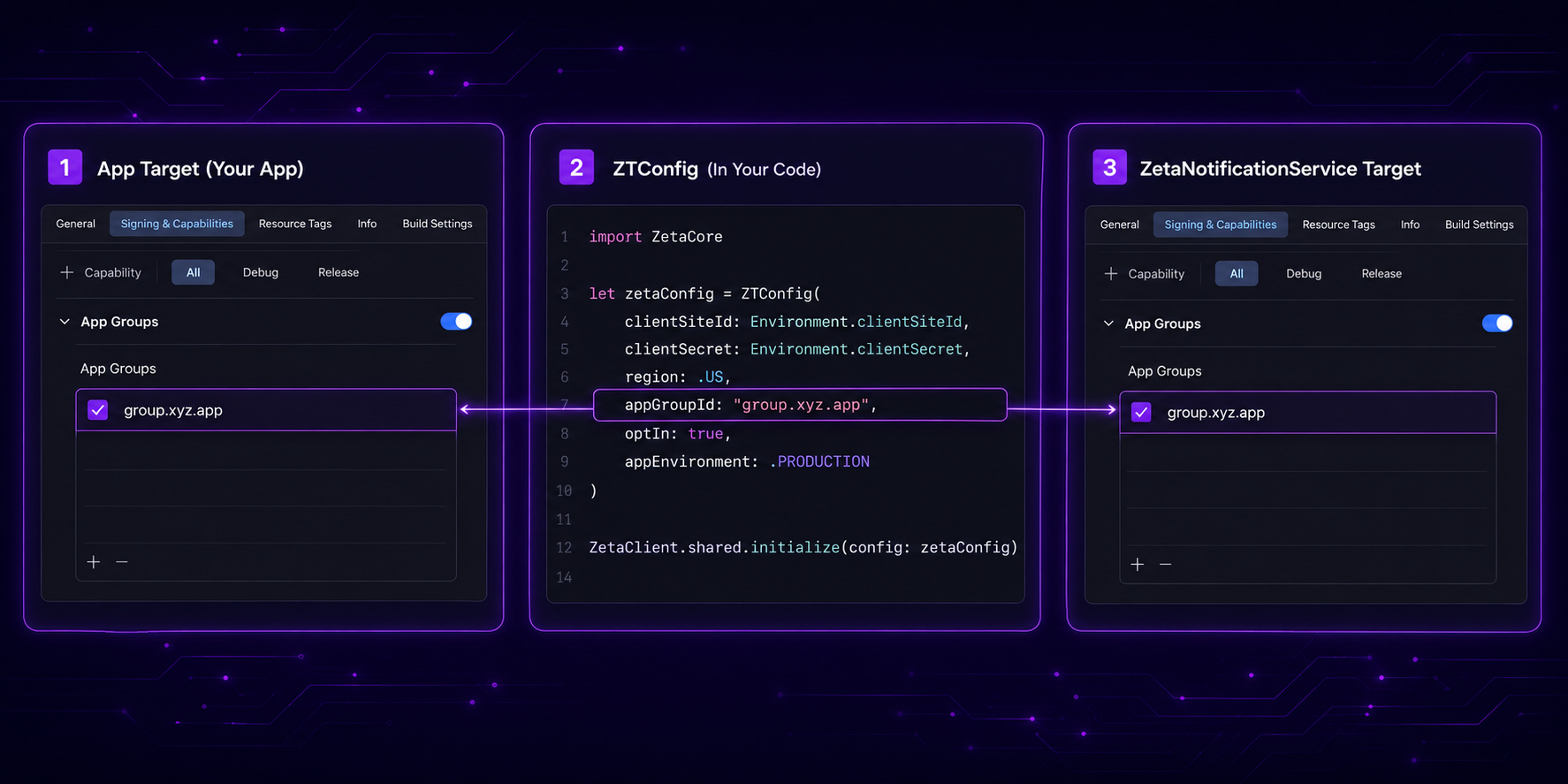
Build errors
| Error | Fix |
|---|---|
No such module 'ZetaNotificationService' | Confirm the library is added to the extension target in your SPM dependencies (or the XCFramework is linked). Clean the build folder (Cmd+Shift+K) and rebuild. |
| Duplicate symbols | ZetaNotificationService is linked to both the main app and the extension. Remove it from the main app target. |
| Minimum deployment target | Set the extension's deployment target to iOS 13.0 or higher. |
| Signing errors | The extension needs its own App ID in the Apple Developer portal, included in both Development and Distribution provisioning profiles. |
APNS error codes
These errors are returned by APNS when a push send fails. Some are caused by app-side configuration (marked Developer action); others originate at the provider layer (marked Escalate to Zeta).
Source: Apple: Handling error responses from APNs
Token errors
BadDeviceToken (HTTP 400) — Developer action
The device token is invalid. Common causes:
- The token was not forwarded correctly via
updateDeviceToken(token:). - The token belongs to one APNS environment (sandbox or production) but the send targeted the other. See Sandbox vs production.
- The user uninstalled and reinstalled the app, generating a new token that has not yet been forwarded to the SDK.
Unregistered (HTTP 410) — Developer action
The device token is no longer active. This typically means:
- The user uninstalled the app.
- Push credentials (certificates or
.p8key) were rotated, and users registered with the previous credentials have stale tokens until the app re-registers them.
This error does not mean the user is push-disabled — only that a specific token was removed. It is common for testers who frequently install and uninstall the app.
Authentication errors
These indicate a mismatch between the push credentials and the app. They are configured on Zeta's side and require escalation.
| Error | HTTP | Description |
|---|---|---|
InvalidProviderToken | 403 | The .p8 authentication key or .p12 certificate does not match the app's bundle ID or Team ID. |
ExpiredProviderToken | 403 | The JWT authentication token has expired. |
MissingProviderToken | 403 | No certificate or JWT token was provided with the request. |
BadCertificate | 403 | The TLS client certificate is invalid. |
BadCertificateEnvironment | 403 | The certificate is for the wrong APNS environment (sandbox vs production). |
Resolution: Contact your Zeta account team. These errors originate in the push dispatcher's credential configuration.
Payload errors
PayloadTooLarge (HTTP 413) — Developer action
The notification payload exceeds the APNS limit (4 KB for regular notifications). If you use Additional Values in the ZMP campaign builder, large or numerous key-value pairs can push the payload over the limit. Reduce the number or size of Additional Values.
PayloadEmpty (HTTP 400) — Escalate to Zeta
The push request was missing a notification payload. This typically indicates a ZMP campaign misconfiguration.
BadRequestPayload (HTTP 400) — Escalate to Zeta
The JSON payload was malformed. Contact your Zeta account team.
Topic errors
TopicDisallowed (HTTP 400) — Escalate to Zeta
The bundle ID in the push request is not allowed for the authentication credentials being used. This can occur when a push type suffix is appended to the bundle ID. Contact your Zeta account team.
Rate limiting
TooManyRequests (HTTP 429) — Informational
Too many requests were sent to the same device token in a short period. APNS throttles delivery. The condition is temporary and resolves on its own.
TooManyProviderTokenUpdates (HTTP 429) — Escalate to Zeta
The provider authentication token is being refreshed too frequently (APNS allows updates no more than once every 20 minutes). This affects the push dispatcher and requires escalation to the Zeta engineering team.
Server errors
| Error | HTTP | Description |
|---|---|---|
InternalServerError | 500 | An unexpected error on Apple's side. Transient — retry the send. |
Shutdown / ServiceUnavailable | 503 | APNS is shutting down or temporarily unavailable. Transient — retry the send. |
See also
- Push Notifications — device tokens, click tracking, deeplinks, FAQ.
- Push Notifications / NSE — setup and delivery tracking.
- Apple: Troubleshooting push notifications
- Apple: Handling error responses from APNs
Updated 4 months ago